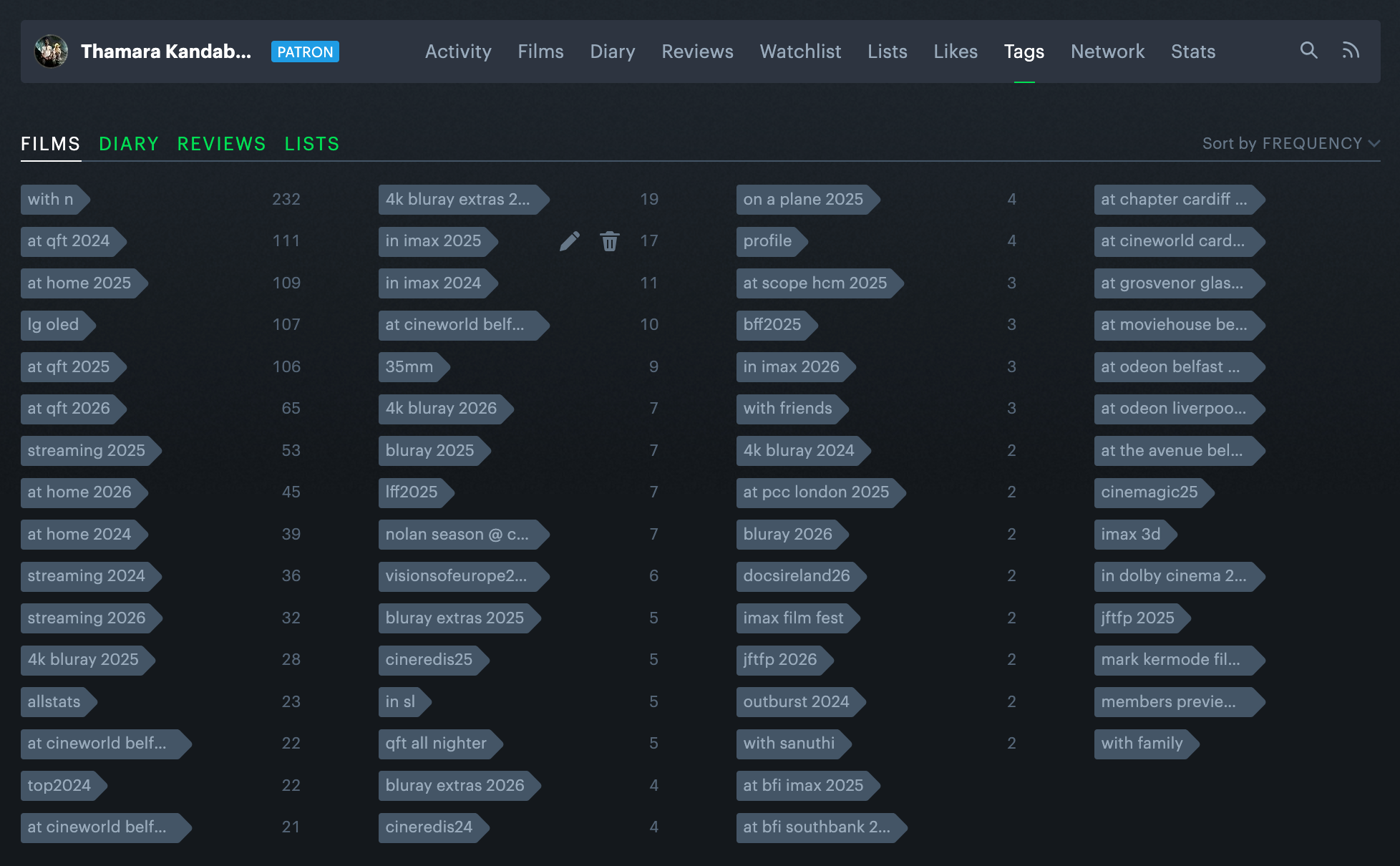
In my previous post, I included a breakdown of where I had watched my first one hundred films this year. I realised that I didn’t sufficiently explain how I had this data on hand. So, this post will be an explainer on how I use tags in Letterboxd to organise my film diary in a loosely hierarchical structure.
The tags feature is great because tags are customisable and there is no one correct way of using them. What follows is what works for me. The purpose of this post is twofold: a. to serve as a guide for anyone interested in adding granular details to their Letterboxd diary entries, and b. to keep as a snapshot of this current usage myself, in case I decide to change things in the future.
My tags are primarily organised around 3 kinds of metadata: the company I had, the location I was at, and the format of the film. Here are some examples.
Company
These tags are generally only used if I had been with someone when I watched the film. There is no tag to note that I saw something by myself; that information can only be gleaned from the absence of one of these tags.
Some of the commonly used tags of this category are:
with n- with my wife, Nuwaniwith friendswith familyetc.
Location
This category of tags is useful for determining where I was when I saw a certain film. These are the tags I looked at to figure out my stats for the previous post. They generally look like this: at qft 2026, at cineworld belfast 2025, at home 2024, on a plane 2025, etc.
Note how I include the year in the tag. This is useful because by doing this, I forgo the need to run the data through a secondary filter to figure out when a film was seen at a particular location.
Format
These tags look like 4k bluray 2026, in imax 2026, in dolby cinema 2024, streaming 2025 etc. The years are included in these tags, too. There is a notable exception, my 35mm tag, which doesn’t include the years purely due to an oversight. I should correct this soon, before I accumulate a large number of diary entries in this format without a timestamp.
More granularity
I use other tags to add more layers of detail, such as film festivals and special screenings, to entries that require it. These tags are helpful for producing lists such as My LFF 2025, Ranked (for which the corresponding tag was lff 2025).
I’ve also created an lg oled tag to keep track of the films that I watch on my C4 OLED TV at home. This does not serve any particular purpose, because I already have at home [year] tags, and I only ever watch films on the TV when I’m at home (who watches films on their phones or laptops!?). But I’ve kept using the tag all the same.
I also keep track of physical media extras. On my tags page, you can see tags such as 4k bluray extras 2026 and bluray extras 2025 which facilitate this.
Tag combinations and dependencies
The best information is recorded when two or more of the above tag categories are used in conjunction. For example, if a diary entry had the following tags: with n at qft 2026 cineredis2026 35mm, that tells me that I was fortunate enough to see a 35mm print of this film at QFT, on the Cinema Rediscovered 2026 programme, with my wife.
Some dependencies exist, and because Letterboxd does not have an option to declare these, or even the ability to have nested tags, they exist only in my head. But they are self-explanatory, e.g., you would never see the tags at cineworld 2026 and 4k bluray 2026 on the same diary entry.
Generic tags
Letterboxd has some universally defined tags, such as allstats, which is used to generate a list of your all-time favourite films on the lifetime stats page, and the top[year], tag which populates the favourite films section on yearly stats pages. I use these, too.
And there it is. Anyone can use this or a similar (perhaps better?) system to enrich Letterboxd data for statistical purposes. But the galling need to file aspects of your life away into neat little virtual folders? That, my friends, cannot be learned. You have to be born with it.
- Topics:
- Letterboxd
- Film
- Diary
- Habits
If something in this post resonated with you, please leave a comment below. You can also respond via email or webmention.
Reference this post: When referencing this post, I prefer to be called Thamara, Thamara Kandabada, or Thamara's Notebook. URL:


.gif "Made with HTML")